
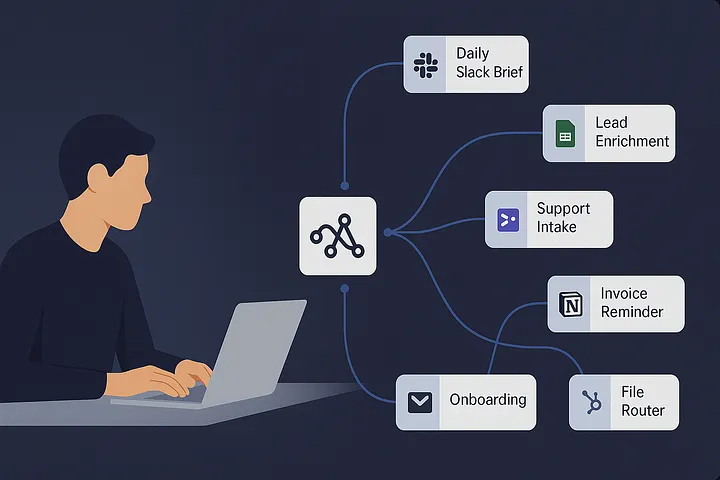
What Makes These Workflows Stick
Great n8n automations are boring in the best way: they run, they log, they fail safely, and they don’t page you at 2 a.m. The playbook below leans on three habits:
- Triggers you trust: webhooks > blind polling.
- Idempotency: dedupe by a unique key before you create anything.
- Human-in-the-loop: approvals for risky steps and clear alerts for errors.
You’ll see those principles woven through every workflow.
1) Daily Slack Brief (Team Status in One Ping)
Use when: You waste 20 minutes gathering numbers for standup.
Trigger: Cron, 08:30 local time.
Flow: Pull top deals from CRM, overdue tickets from helpdesk, two KPIs from a Google Sheet → format → post to a Slack channel with a quick call-to-action.
Tiny code that helps (formatting list):
const rows = items.map(i => i.json);
const lines = rows.slice(0,5).map(r => `• ${r.name} – ${r.stage} – $${r.amount}`);
return [{ json: { text: `Top 5 deals today:\n${lines.join('\n')}` } }];
Why it saves time: No manual hunting. Everyone starts the day aligned.
2) Lead Capture → Enrich → Route (No SaaS Tax Required)
Use when: Marketing form submissions need context before hitting sales.
Trigger: Webhook from your site.
Flow: Normalize contact data → ping low-cost enrichment endpoints or internal tables → score lead → create CRM record → DM the right AE if score ≥ threshold.
Idempotency tip:
Before creating the lead, check a lightweight store (Google Sheet or DB) for email_hash. If it exists, skip create and just update.
3) Smart Support Intake (Auto-Label + VIP Fast Lane)
Use when: Support@ inbox is a time sink.
Trigger: IMAP Email node, watching an inbox.
Flow: Parse subject/body → route by product keyword → create helpdesk ticket → auto-acknowledge with a clean, personal email → archive original. VIP domains get a “priority” tag and Slack alert.
Why it works: Your queue stays tidy, and VIPs never languish.
4) Invoice Reminder That Doesn’t Sound Robotic
Use when: Collections touches are ad hoc and awkward.
Trigger: Daily.
Flow: Read overdue invoices from accounting sheet → generate friendly reminder copy → send email → write a “touched on” timestamp to the sheet to prevent spamming.
Helpful snippet (polite copy):
const i = $json;
return [{
  json: {
    subject: `Gentle nudge: Invoice #${i.number}`,
    body: `Hi ${i.contact},\n\nJust a quick note that invoice ${i.number} (${i.currency}${i.amount}) was due on ${i.due}. \
If you've already sent it, thank you! Otherwise, here's the payment link.\n\nBest,\nFinance`
  }
}];
5) Meeting Notes → Actionable Tasks (AI-Free and Reliable)
Use when: Decisions get lost in docs and DMs.
Trigger: When a new meeting note is saved in Notion/Docs.
Flow: Parse bullet points for patterns like TODO: or @owner → create tasks in your tracker with due dates → post a summary back to the channel.
Why it saves time: People leave the call with clarity — and tasks exist where work happens.
6) Content Pipeline: Ideas → Drafts → Calendar
Use when: Content ideas die in spreadsheets.
Trigger: New row in “Ideas” sheet or a Slack slash command.
Flow: Create a drafting doc with a prefilled outline → assign an owner and due date → add to editorial calendar → DM the owner with the brief.
Durability tip: Keep a small “Run Log” sheet with columns for timestamp, idea ID, status, and any error. Non-engineers understand it instantly.
7) HR Onboarding Without Ticket Ping-Pong
Use when: You’re juggling account setups across tools.
Trigger: New hire row added to HR sheet.
Flow: Create accounts (SSO/Slack/Docs), add to groups, generate a “Day 1” checklist, DM the manager with confirmations.
Guardrail: Add a manual approval step before provisioning to avoid mistakes.
Small utility code (normalize names):
const toSlug = s => s.toLowerCase().replace(/[^a-z0-9]+/g, '-').replace(/(^-|-$)/g, '');
return items.map(i => ({ json: { ...i.json, slug: toSlug(i.json.full_name) } }));
8) File Router: Invoices, Receipts, and the Right Folder
Use when: Files pile up in a generic drive folder.
Trigger: New file in “Incoming.”
Flow: Inspect filename/vendor; extract date and amount; move to /Finance/YYYY/MM and rename consistently; add a row to a ledger sheet.
Why it’s sticky: Humans drop files anywhere. The system fixes it quietly.
9) Incident Escalation With Real Signal
Use when: Alerts are noisy or get lost.
Trigger: Webhook from monitoring.
Flow: Triage by severity and service; page on-call only for Sev1; for Sev2, create a tracker ticket, collect logs, and post a Slack thread with next steps; auto-close when recovery webhook arrives.
Reliability trick: Use retries with exponential backoff on all external calls. Respect rate limits with short Wait nodes.
10) Data Hygiene: De-dupe and Canonicalize
Use when: CRM/Sheets get messy, fast.
Trigger: Hourly.
Flow: Scan for duplicates by email/phone hash; merge fields into a single “golden” record; push updates back to CRM and mark dupes archived.
Fingerprint helper:
import crypto from 'crypto';
return items.map(i => {
  const email = (i.json.email || '').trim().toLowerCase();
  const phone = (i.json.phone || '').replace(/[^\d+]/g,'');
  const key = crypto.createHash('sha1').update(email + '|' + phone).digest('hex');
  return { json: { ...i.json, dedupe_key: key }};
});
Naming, Secrets, and Safety (The Boring Stuff That Prevents Fires)
- Consistent names:
sales_daily_brief,support_intake_router,finance_invoice_nudge. You’ll find things faster. - Secrets centralization: Store credentials in n8n Credentials, never in nodes. Rotate on a schedule and note the next rotation date in the description.
- Approvals where needed: Anything that messages customers, changes money, or deletes data gets a manual gate.
- Observability for non-engineers: A simple run log (sheet or DB) with status, input ID, and error snippet beats a fancy dashboard nobody opens.
- Backups & versioning: Export critical workflows after changes. Keep a tiny
CHANGELOG:in the description field.
Quick Setup Patterns You’ll Reuse
Reliable Webhooks: Prefer webhooks from your apps to reduce polling noise. When polling is unavoidable, keep a lastCheckedAt cursor and filter in the query if possible.
Idempotent Creates:
Before creating anything, check a store for a unique key (email, external ID, or a hash). If present, update instead of create. It’s the difference between calm and chaos.
Error Handling:
Add a Failure branch that posts a short human message: “Lead router failed for acme.com — retrying in 5 min.” People respond to plain English, not stack traces.
A One-Week Adoption Plan
- Day 1: Pick one repetitive task that touches two apps.
- Day 2: Build a minimal happy path with 3–5 nodes.
- Day 3: Add dedupe, approval (if risky), and logging.
- Day 4: Add alerts and retries.
- Day 5: Hand it to a teammate. If they can explain it in 60 seconds, you built it right.
Closing Thought
You don’t need a giant platform to get leverage. You need a handful of dependable workflows that remove the pebbles from everyone’s shoes. Start small, add guardrails, and let n8n quietly give your team back a few hours — week after week.
