
Google has launched one of the most developer-friendly releases of the year — fully-managed, remote MCP servers.
If that sentence doesn’t immediately excite you, don’t worry. By the end of this article, you’ll understand:
What MCP means
How it unlocks Google Cloud services for AI agents
How a demo “Bakery Launcher” app proves its power
How you can start experimenting yourself
Let’s make this as simple as possible.

First — What is MCP?
Think of MCP (Model Context Protocol) as a bridge linking AI models to real-world tools.
Before MCP:
- AI was intelligent but blind — it couldn’t directly call APIs.
With MCP:
- AI can call APIs safely and reliably — such as BigQuery, Google Maps, Kubernetes, or even your own enterprise APIs.
Imagine ChatGPT or Gemini saying:
“Let me fetch live sales data for you… okay, done.”
That is MCP.


Google’s Big Upgrade: Fully-Managed Remote MCP Servers
Google has made MCP easier, more secure, and enterprise-friendly.
Now AI agents can access tools like:
- Google Maps — Grounding AI to physical locations
- BigQuery — Reasoning and querying enterprise data
- Google Compute Engine — Automated infrastructure workflows
- Google Kubernetes Engine — Autonomous operations
All through a single unified, remote MCP endpoint.
You don’t deploy the server.
You don’t configure networking.
You point your AI client to Google.
Enterprise-grade Benefits
Google’s remote MCP layer brings:
Tool auto-discovery
IAM-based access control
Fine-grained permissions
Model Armor for prompt filtering and safety
If AI were a car, MCP is a highway — and now Google has built smooth, secure lanes.
Demo: “Launch My Bakery”
To demonstrate this functionality, Google created a practical scenario:
“Help a friend launch a high-end sourdough bakery in Los Angeles.”
Sounds fun, but it does real work:
- Reads demographic datasets (BigQuery)
- Analyses bakery pricing (BigQuery)
- Maps competitor density (Maps)
- Forecasts revenue (Sales data)
The agent functions like a business analyst you never hired.

Repo Structure
launchmybakery/
├── data/                        # Pre-generated CSV files for BigQuery
│   ├── demographics.csv
│   ├── bakery_prices.csv
│   ├── sales_history_weekly.csv
│   └── foot_traffic.csv
├── adk_agent/                   # AI Agent Application (ADK)
│   └── mcp_bakery_app/          # App directory
│       ├── agent.py             # Agent definition
│       └── tools.py             # Custom tools for the agent
├── setup/                       # Infrastructure setup scripts
│   ├── setup_bigquery.sh        # Script to provision BigQuery dataset and tables
│   └── setup_env.sh             # Script to set up environment variables
├── cleanup/                     # Infrastructure clean up environment
│   ├── cleanup_env.sh           # Script to remove resources in environment
└── README.md                    # This documentation
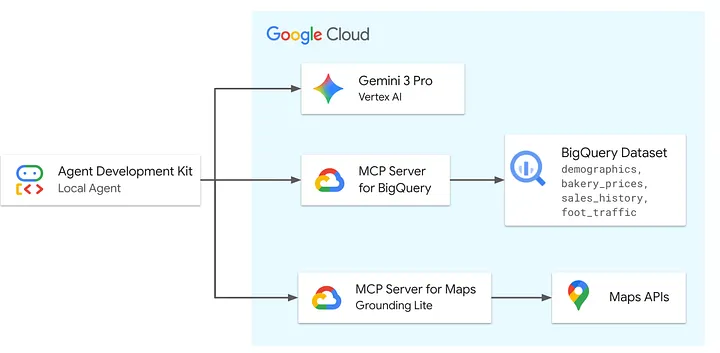
How the Agent Works at a High Level
The agent:
- Accepts natural language input
- Calls remote MCP tools
- Pulls real data
- Synthesizes insights
Architecturally:
User Input → Gemini Agent → MCP Server → BigQuery + Maps → Insight → Response
Let’s Code a Thought Exercise
Imagine Python being able to talk to BigQuery like this:
result = mcp.call("bigquery.query", {
    "sql": "SELECT zip, morning_score FROM foot_traffic ORDER BY morning_score DESC LIMIT 1"
})
print(result)
Or call Google Maps:
maps = mcp.call("maps.search_places", {
    "location": "90403",
    "keyword": "Bakery"
})
This is how the ADK agent thinks.
Want to Try It?
1. Clone the repo
git clone https://github.com/google/mcp.git
cd mcp/examples/launchmybakery
2. Authenticate
Run the command below to authenticate with your Google Cloud account. This step is necessary for the ADK to access BigQuery.
gcloud config set project YOUR_PROJECT
gcloud auth application-default login
3. Set up environment
Run the environment setup script. This script will:
- Enable the required Google Cloud APIs (Maps, BigQuery, remote MCP).
- Create a restricted Google Maps Platform API Key.
- Create a
.envfile with required environment variables.
chmod +x setup/setup_env.sh
./setup/setup_env.sh
4. Provision BigQuery
Run the setup script, which automates these steps:
- Creates a cloud storage bucket.
- Uploads the CSV data files.
- Creates the
mcp_bakeryBigQuery dataset. - Loads data into BigQuery tables.
chmod +x setup/setup_bigquery.sh
./setup/setup_bigquery.sh
5. Run the intelligent Bakery Agent
# Create virtual environment
python3 -m venv .venv

# If the above fails, you may need to install python3-venv:
# apt update && apt install python3-venv

# Activate virtual environment
source .venv/bin/activate

# Install ADK
pip install google-adk

# Navigate to the app directory
cd adk_agent/

# Run the ADK web interface
adk web
Open the web UI, start chatting with your bakery consultant AI.
What’s Impressive?
The agent can answer questions like:
“Which zip has highest morning foot traffic?”
“Is bakery density too high there?”
“What premium price can I charge?”
“Forecast December 2025 revenue at $18/loaf.”
It queries real datasets, reasons over them, and maps the world context.
Why This Matters
This is the future of AI application development.
Instead of:
- writing CRUD APIs
- building custom data pipelines
- managing auth per service
You let MCP do it.
And your AI agents become:
analysts
planners
data reasoners
infrastructure operators
Final Thoughts
Google didn’t just release an API layer — it delivered a new development paradigm.
With remote MCP servers:
- AI becomes operationally useful.
- Developer experience gets radically simplified.
- Enterprises finally get safe, governed AI integration.
Whether you’re building:
a bakery forecast agent
a sales planner
an AI ops assistant
a location analyzer